How to Start an Online Electronics Store (and Make a Profit)
How to Start an Online Electronics Store (and Make a Profit)
Electronics look like an easy category to sell online. Everyone needs headphones, chargers and keyboards, and shoppers search for them by name. The catch is that every big retailer had the same idea. To learn how to start an online electronics store that actually makes money, you need to know where the margin hides, how to source products you can stand behind, and how to answer spec questions better than the giants.
This guide covers niche choice, sourcing, pricing, product data, warranties, battery shipping, SEO and marketing, then shows a ready-made storefront you can launch on.
Why Electronics Is a Hard (but Good) Category
Three things make electronics different from fashion or home goods:
- Prices are easy to compare. A shopper can paste a model number into a search bar and see twenty prices. On popular devices you will rarely be the cheapest.
- Margins on headline products are thin. Brands and distributors control pricing on hero devices, so the markup on popular headphones or a smartwatch is often small.
- Buyers research first. They want specs, compatibility, battery life and warranty terms. A store that hides them loses the sale.
The flip side is your opportunity. Researchers stay loyal to stores that help them decide, accessories carry healthier margins, and a focused niche lets a small store be more useful than a retailer with fifty thousand products.
How to Start an Online Electronics Store: Pick a Niche First
Don't open "an electronics store". Open one for a specific buyer. A niche makes sourcing easier and content sharper.
| Niche | Typical buyer | Where the margin comes from | Watch out for |
|---|---|---|---|
| Gaming peripherals | Players upgrading keyboards, mice, headsets | Keycaps, switches, mats, cables | Fast-moving trends, returns on "feel" |
| Audio | Commuters, home listeners, creators | Cases, stands, cables, ear tips | Counterfeits of popular models |
| Charging and cables | Everyone with a phone or laptop | Frequent add-ons, cheap to ship | Safety certification, cheap copies |
| Smart home | Renters and homeowners automating rooms | Bundles (plugs, sensors, hubs) | Compatibility questions, app support |
| Refurbished devices | Budget and eco-minded buyers | Grading, warranty, accessories | Testing time, honest condition notes |
| Creator gear | Streamers, podcasters, video makers | Mounts, lights, mics, kits | Expert questions before purchase |
Pick a niche where you can answer a customer's question without looking it up. That knowledge is your edge over bigger stores.
Where the Profit Really Comes From
Small electronics stores rarely make their money on the device in the photo. They make it on what goes in the cart next to it.
Accessories. Cases, cables, chargers, stands and keycaps usually carry a higher markup than the device, and they cost little to ship.
Bundles. A "desk setup" of keyboard, mouse, wrist rest and cable sells as one decision instead of four. Discount it a little and you still earn more than on the keyboard alone.
Cross-sells. "Goes well with" on the product page and a suggestion in the cart solve a real need: new headphones need a case, a new phone needs a fast charger.
Free-shipping thresholds. Set the threshold just above your typical device price so a cable or case tips the order over.
To plan pricing, work out your landed cost (product, freight, duties, payment fees, packaging), then decide which items are traffic drivers sold near cost and which are margin items.
Sourcing: Authorised Suppliers, Grey Imports and Refurbished Stock
- Authorised distributors and brands. The manufacturer warranty is usually valid where you sell, the product has the right plug and certifications, and you get spec sheets and images. Ask what the reseller agreement requires, including any minimum advertised price.
- Grey imports. Genuine products bought in another market can look cheaper, but the manufacturer warranty may not apply, chargers may have the wrong plug or lack local certification, and some devices are region locked. If you sell grey stock, say so and offer your own warranty.
- Private label. Accessories made under your brand can carry good margins, but quality, safety testing and support become your job. Test samples yourself.
- Refurbished. Grade stock honestly ("like new", "good", "fair"), list cosmetic marks, test battery health and offer a clear warranty.
Avoid any supplier who can't show where the stock came from. Counterfeit chargers and batteries are a safety risk, not just a brand problem.
Safety certification for chargers and batteries
Mains chargers, power banks and anything with a lithium battery are the highest-risk products in the category, and most markets have safety and labelling rules for them. Before you list one, ask the supplier for test reports and certificates for your market, check the plug, voltage range and markings, and keep copies. Don't sell chargers you can't trace to a factory. The rules differ by country, so check the rules where you sell.
Product Pages That Answer the Spec Questions
Shoppers arrive with a list of questions, and every unanswered one is a reason to buy elsewhere.
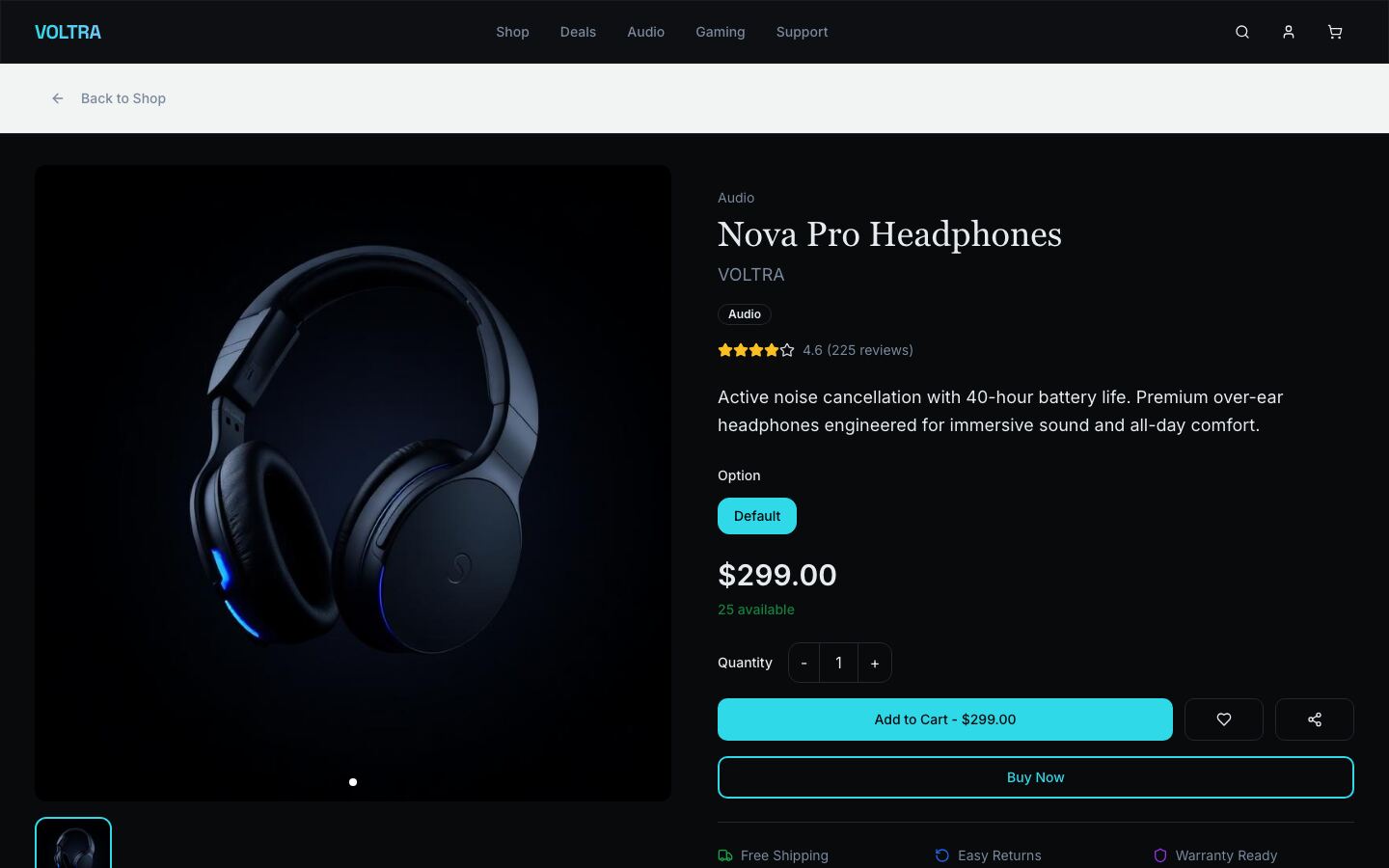
Show these on every page:
| Field | Why it matters |
|---|---|
| Model number and brand | Shoppers search by model. It also proves the item is genuine. |
| Key specs in a table | Battery life, connectivity, ports, weight, dimensions, power. Use the same units on every page. |
| Compatibility | "Works with" lists for phones, consoles, operating systems and chargers. |
| What's in the box | Cables, adapters and cases, so nobody expects a charger that isn't there. |
| Options and stock | Colour, size, storage or switch type, with stock per option. |
| Warranty and returns | Length, who provides it, and a link to the full policy. |
Above the spec table, add a short paragraph that says who the product is for. "For long flights and open-plan offices" sells better than a list of frequencies. For photos, show a clean shot, a close-up of the ports, the product in use and the box contents. For the complete list, see the eCommerce product page checklist.
Filters and comparisons
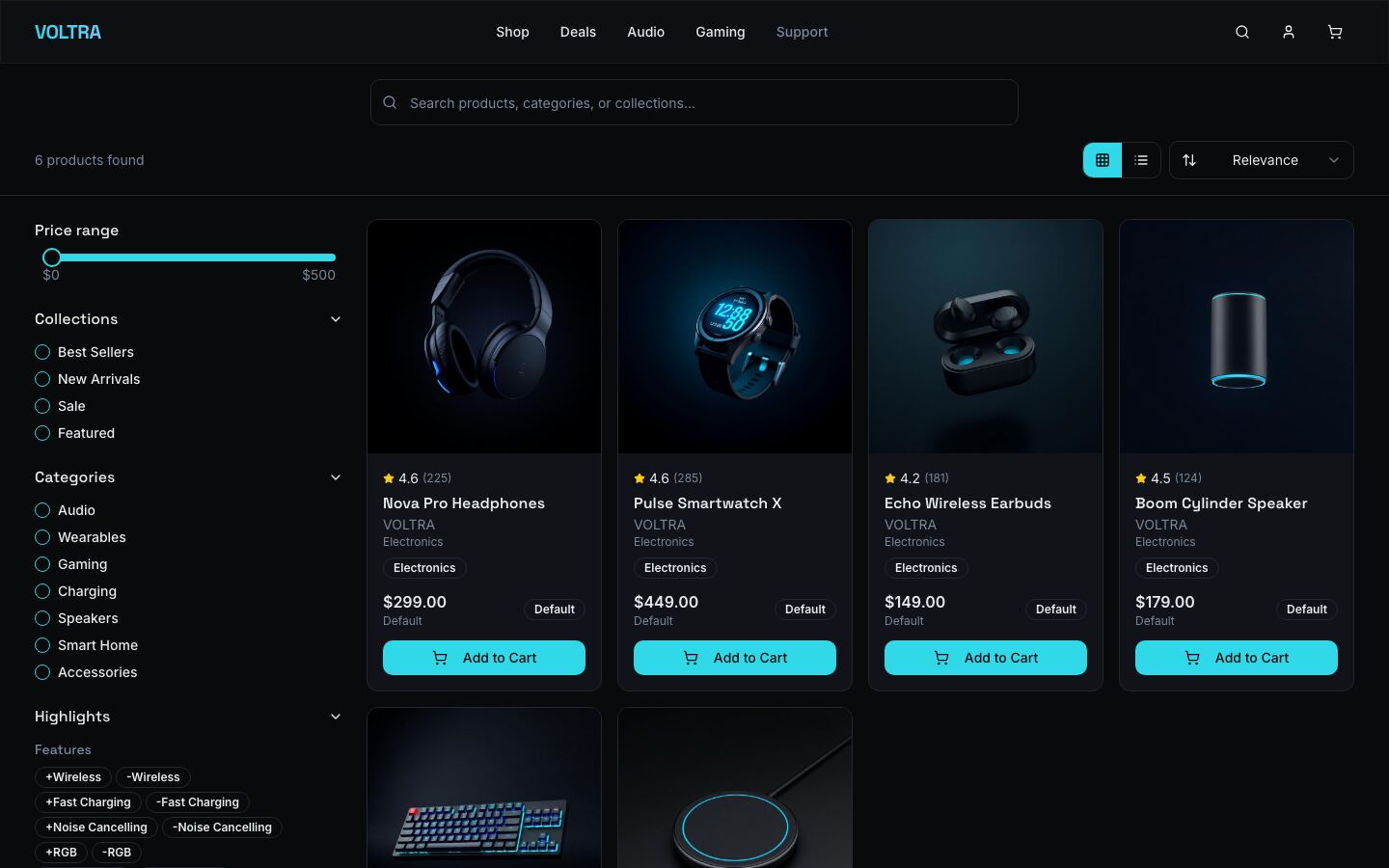
Spec-heavy catalogues live or die by filters. Let shoppers filter by price, category and features such as wireless or fast charging. Comparison content does the rest: "A vs B" guides answer the question a shopper types just before they buy.
Warranties and Returns
Returns are expensive in electronics because a returned device may not be resellable as new. A clear policy protects both sides:
- Explain who covers what. The manufacturer warranty, your store warranty and the customer's legal rights are three different things.
- Have a "dead on arrival" process. Replace faulty-on-arrival items fast, with a prepaid return label.
- Decide on opened items. Say before purchase whether you accept change-of-mind returns on opened earbuds.
- Record serial numbers on dispatch, so you can match returns to orders and spot swaps.
- Grade returns and resell them as open box with honest notes.
Consumer rights for faulty goods differ by country. Check the rules where you sell and write your policy to match.
Shipping Electronics and Lithium Batteries
Electronics are small, valuable and fragile:
- Pack for drops. Put the retail box inside a padded shipping box, not a padded bag.
- Use plain outer packaging so the parcel doesn't advertise what is inside.
- Add tracking, signature and insurance above a value you choose.
- Watch for fraud. Large first orders with different billing and delivery addresses deserve a second look.
Lithium batteries need extra care. Carriers treat them as dangerous goods, and rules usually differ for batteries inside a device, packed with a device, or shipped on their own. Loose power banks are often the most restricted, especially by air. Check your carrier's rules before you list battery products, and use the labels they require.
For choosing between flat rates, live rates and a fulfilment partner, read Shipping for eCommerce MVPs.
SEO for an Electronics Store
Electronics buyers search with intent:
- Model-number pages. Put the full model name in the title and URL, and specs as text, not only in images.
- Compatibility content. "Chargers that work with…" pages catch long-tail searches big stores ignore.
- Buying guides. One honest guide per category, linked to the products it recommends.
- Structured data. Product markup with price, availability and reviews can earn rich results.
Marketing That Works for Gadgets
- Go where your niche talks. Keyboard, audio and gaming communities reward real knowledge, not ads.
- Short videos. Unboxings and "my desk setup" clips sell accessories well.
- Restock emails. A "notify me" list turns a sell-out into a launch.
- Reviews. Ask buyers for a review a week after delivery, once they have used the product.
Launch Faster With Electronics Store, a Ready-Made Next.js Storefront
Electronics Store is a dark, high-contrast storefront built for consumer electronics: audio, wearables, gaming gear, charging and smart home accessories. The demo brand is VOLTRA.
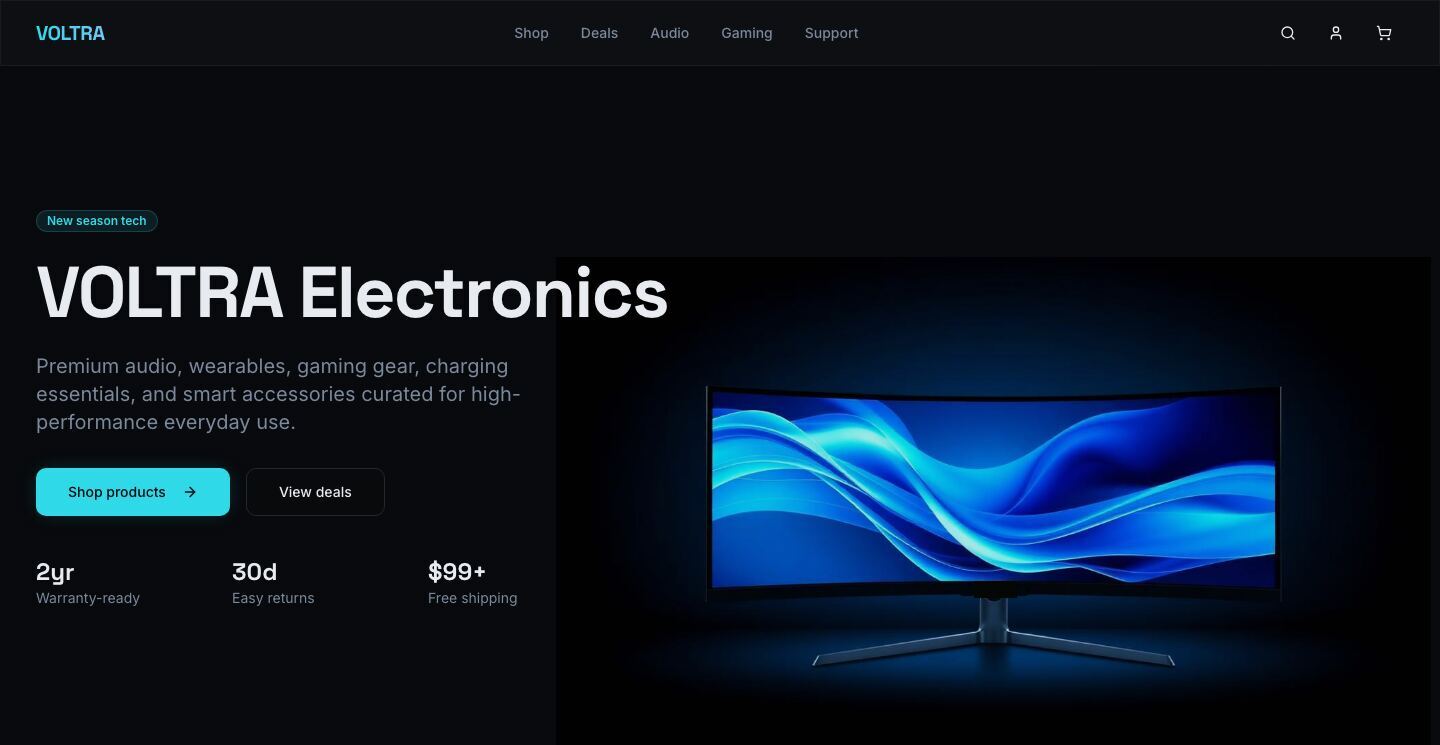
What's inside:
- A home page with trust signals (free shipping, warranty, returns, support), category tiles and featured products
- Search and filters: live suggestions, price range, collections, categories and feature highlights, with sorting and grid or list views
- Product pages with a gallery, options such as colour, case size or switch type, stock levels, reviews, related products and Product structured data
- A wishlist and cart with promo codes, a premium packaging add-on, a free-shipping progress bar and cross-sells
- Step-by-step checkout with Stripe card payments when you add your keys
- Accounts and orders: order history, order look-up, and return and replacement requests once the backend is connected
- A blog for buying guides, plus a sitemap and metadata on every page
It runs straight away on a built-in demo catalogue, with no database. For real orders, connect the open-source commerce backend it is built for, which is included and you host yourself. One command loads your catalogue, and you get an admin dashboard for products, orders, customers, inventory and promotions, plus low-stock alerts. The setup guide walks through each step.
| Stack | Next.js 16, React 19, TypeScript, Tailwind CSS, shadcn/ui |
| Live demo | electronics-store.mvp.sale |
| Price | $39, one-time, for the Next.js Storefront with full source code |
| Get it | Electronics Store |
A mobile app and versions for other frameworks are available on request.
Your First 30 Days
| Week | Do this |
|---|---|
| 1 | Choose your niche. Contact authorised distributors, order samples, and collect certificates for anything with a battery or plug. |
| 2 | Build 20–40 product pages with full specs and compatibility. Set warranty, returns and shipping policies. |
| 3 | Rebrand the storefront, connect payments and your carrier, and publish two buying guides. Go live. |
| 4 | Share guides in niche communities, start a restock email list, and build bundles around the accessories buyers add. |
FAQ
Do I need a lot of money to start an online electronics store? Not if you start with accessories. They need less capital than devices and carry better margins.
Can I dropship electronics? Yes, but test supplier quality, delivery times and return handling first. You are still responsible for the warranty and safety of what you sell.
How do I compete with big retailers on price? Mostly you don't. Compete on expertise, curation, bundles and helpful content.
Start Your Electronics Store
Pick a niche you know, source products you can stand behind, and make every product page answer the spec questions. The margin is in the accessories, the bundles and the trust.
See Electronics Store or browse all ecommerce apps on MVPHub.
The cover image was created with AI image generation. The screenshots are from the Electronics Store demo.